
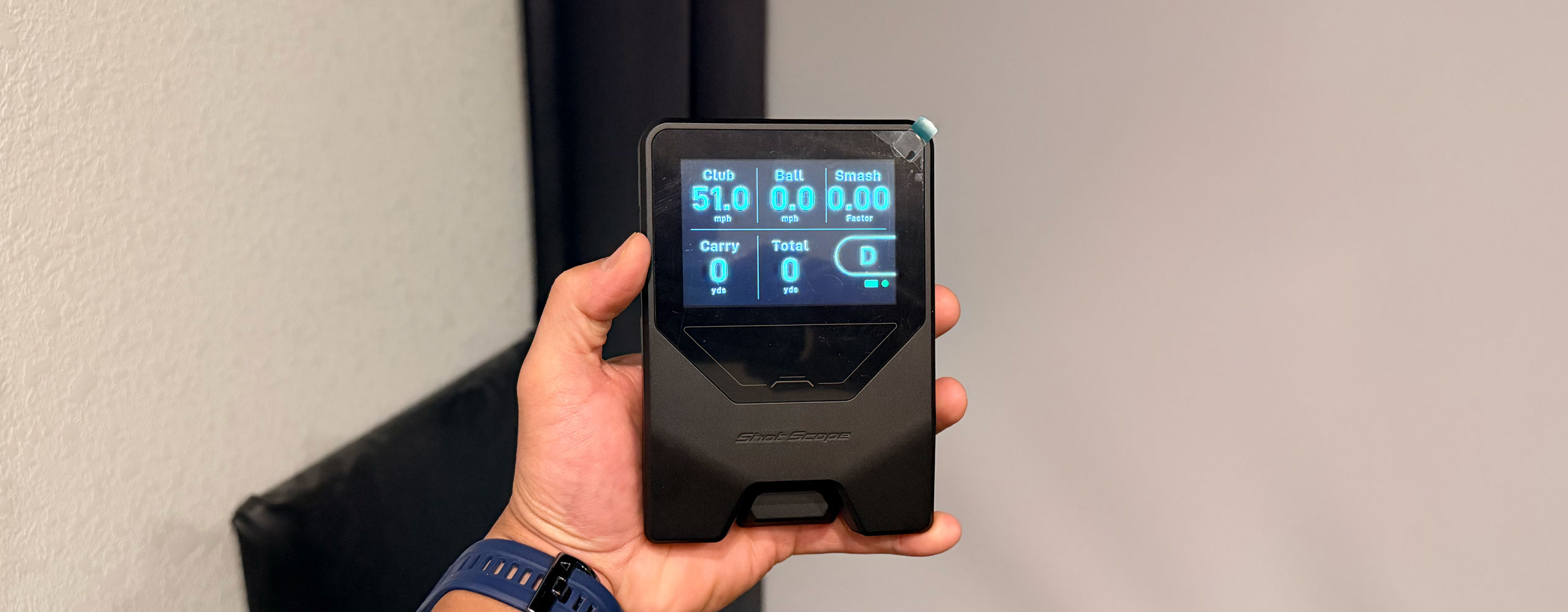
My one liner for this
Impressive, most Impressive.

Those of us who are degenerate golf gear heads have seen and heard the rumors of this unit since it was announced.
For the uninitiated, it was hands down the most hyped product to premiere at the 2026 PGA show, the de-facto industry trade show where golf equipment companies either launch or preview their anticipated products for the coming year.
Shot Scope was making waves by previewing a launch monitor integrated into their app and ecosystem coming in at $200, with supposedly stellar accuracy.
In my opinion, the Shot Scope LM1 (mostly) lives up to the hype, and if you're looking for a unit to help give you some form of measurement for when you are practicing (indoor or outdoor), or something to make the range more interesting, or even have some fun chasing speed on the course, I think the LM1 fits the bill.
And it does all this while getting your foot in the door with a whole performance ecosystem and app for tracking your improvement, with extendability to be combined with the company's other products for shot tracking to help give you insights for practice and course strategy.
With no subscription fee.
Let me say that again for those not familiar with Shot Scope core company principles.
There is NO subscription fee.
That is unheard of in this day in age.
Now the unit is not without its quirks, and minor shortcomings. Again people, 200 dollar unit. We’ll get into what those quirks are in a bit more detail. But depending on your use case, these minor annoyances will probaby not be deal breakers and if youre expectations are set accordingly, I think this is a great tool at a value price.
So lets dive in.
Unboxing
Like other Shot Scope products, their packaging feels somewhat Apple inspired. And why not. It’s clean, premium feeling and fairly minimal.
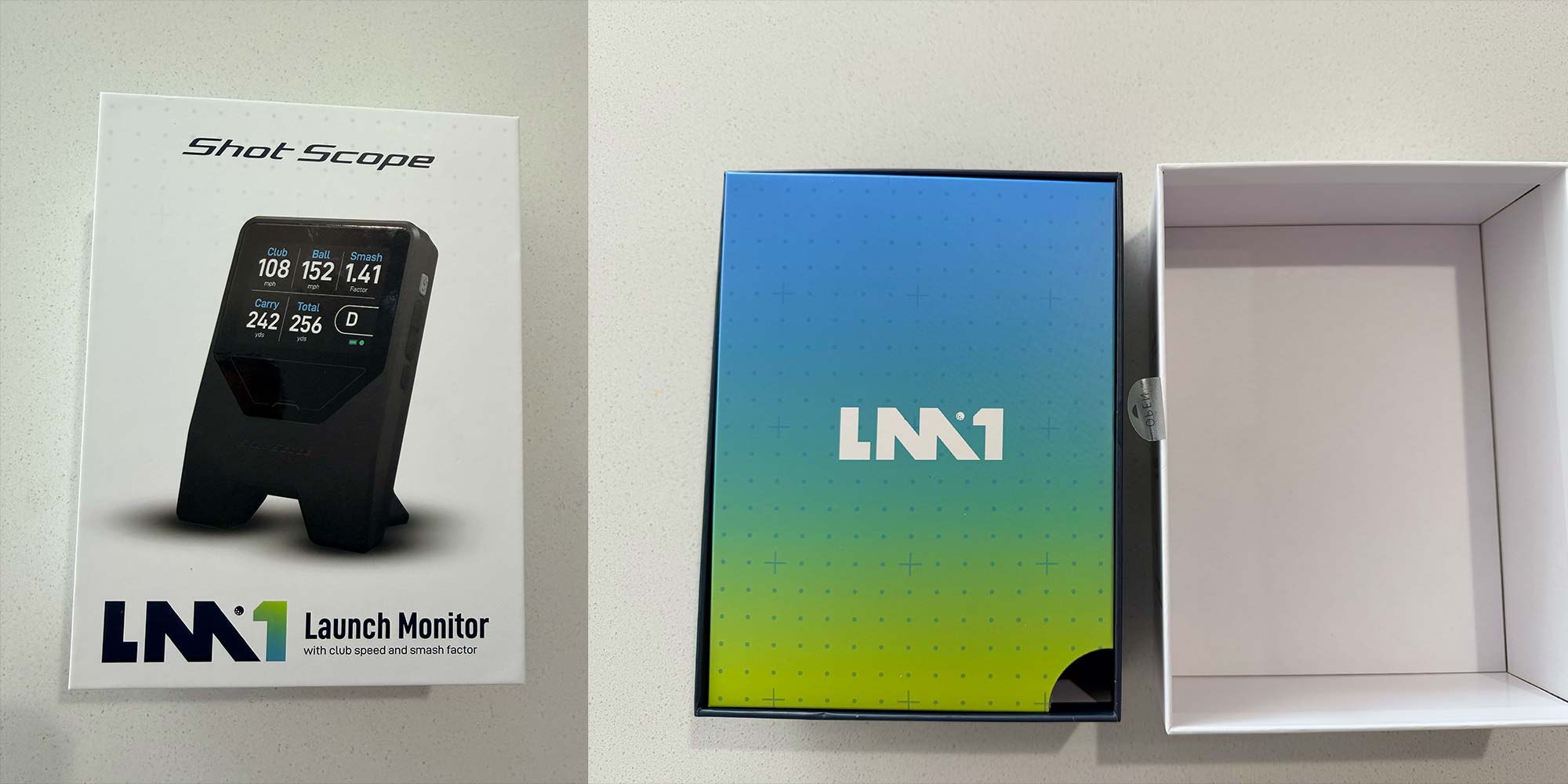
In the box you get the LM1, a USB-A to USB-C charging cable (no brick as is customary these days), instruction manual, quick start guide , wiping cloth, a paper yardage card (kinda un-neccesary in my opinion).
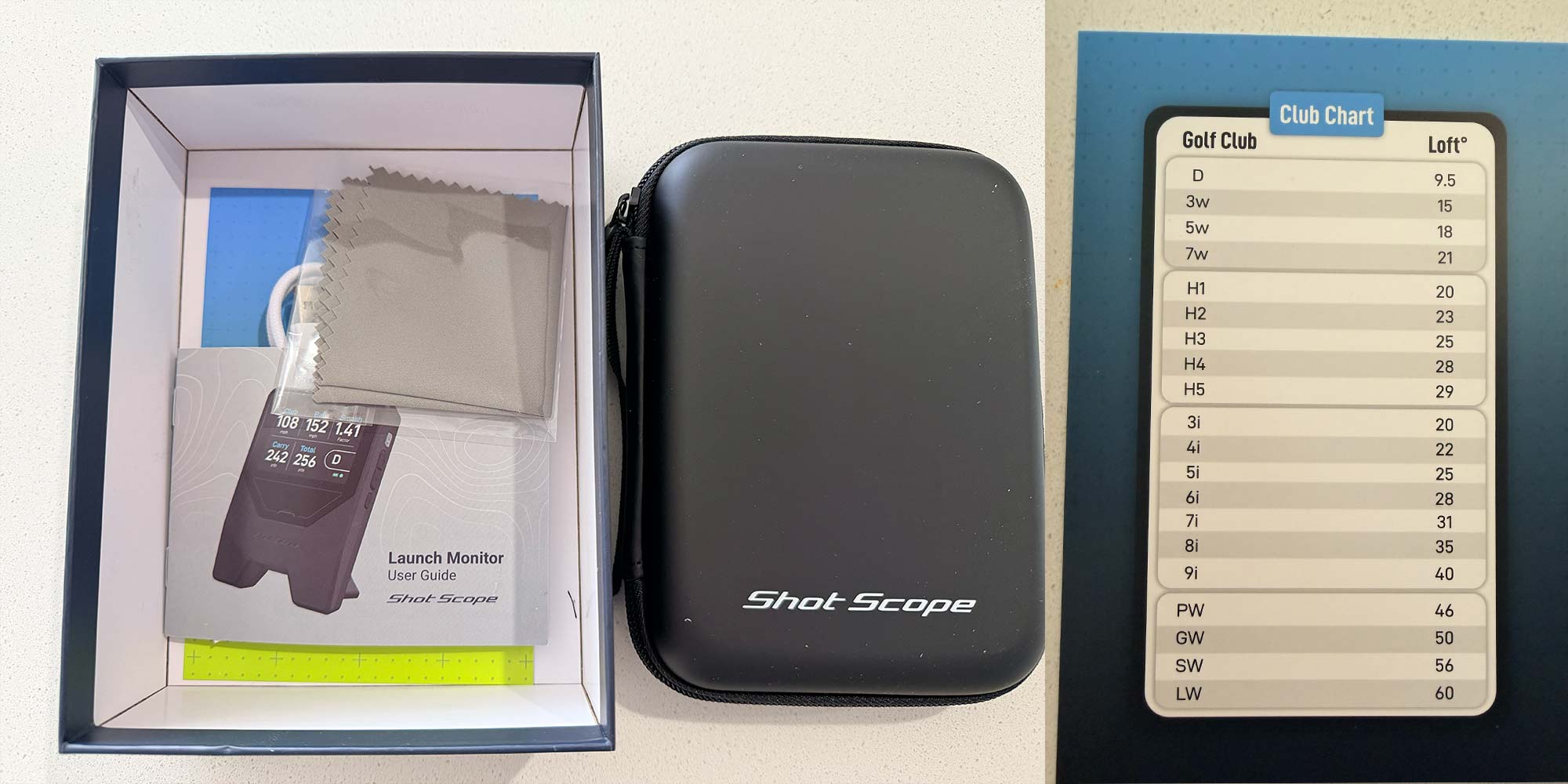
But best of all, a case for the unit is included. Lots of launch monitors in this range, that were clearly designed to be portable, and even more expensive ones, do not come with a case. Very nice for Shot Scope to include that.
The case is simple but seems thoughtfully designed as it’s about the height of a range mat. So if you go to a driving range where they have mats on top of concrete ( as many do) you can put the unit on the case, so it’s at the same level as the range mat.
Setup
Setup was honestly a little more finicky than I wouldve liked. I already had the Shot Scope App on my phone from a previous product I owned, and I updated it right before unboxing, so I thought it would be good to go.
But for whatever reason that didnt work off the bat. I had to follow the explicit QR code in the instructions which somehow took me to what seemed to be the same link for the shot scope app, but now with an update button. So maybe that was just a glitch.
But the point is if you are having trouble, don’t be stubborn and try and do it real quick on your own. Just get the quick start guide and follow it to a tee, or you might be spinning your wheels.
You also have to set up what language you want and what unit of measurement you want directly on the device. But the whole process (if you aren’t like me spinning your wheels) should only take a couple of minutes, and then you’re ready to go.
Getting Started
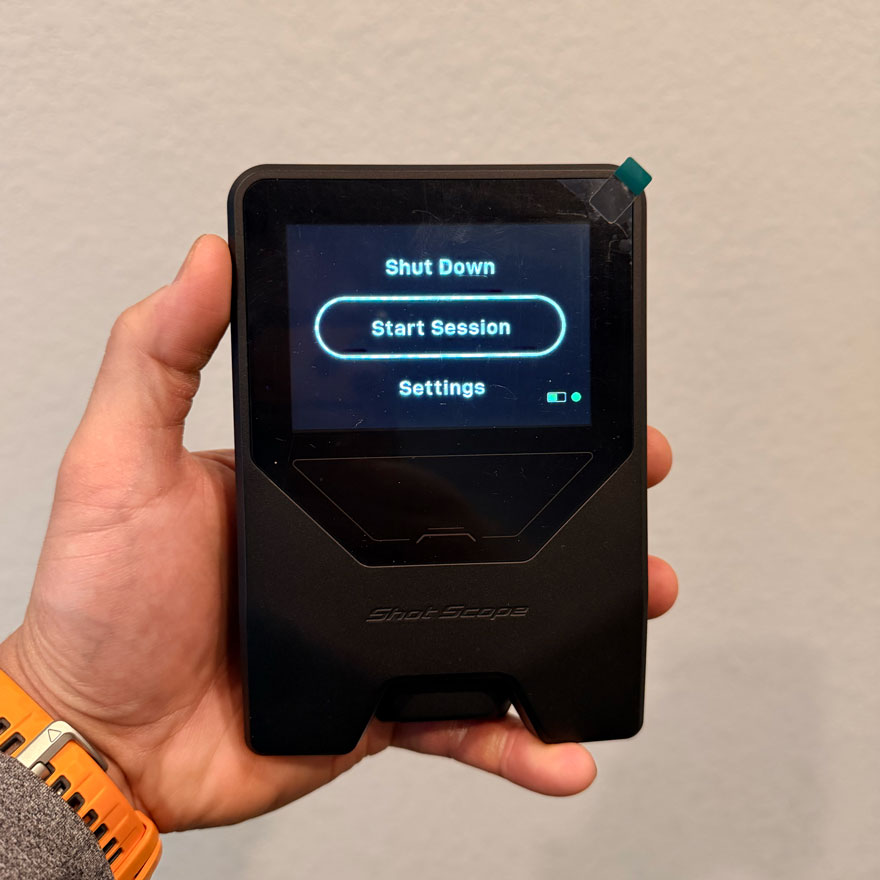
Once you are ready to use the unit. Its pretty simple:
- Power it on
- Start a session
- Put the unit 5-6 feet behind the golf ball on the target line you are aiming at
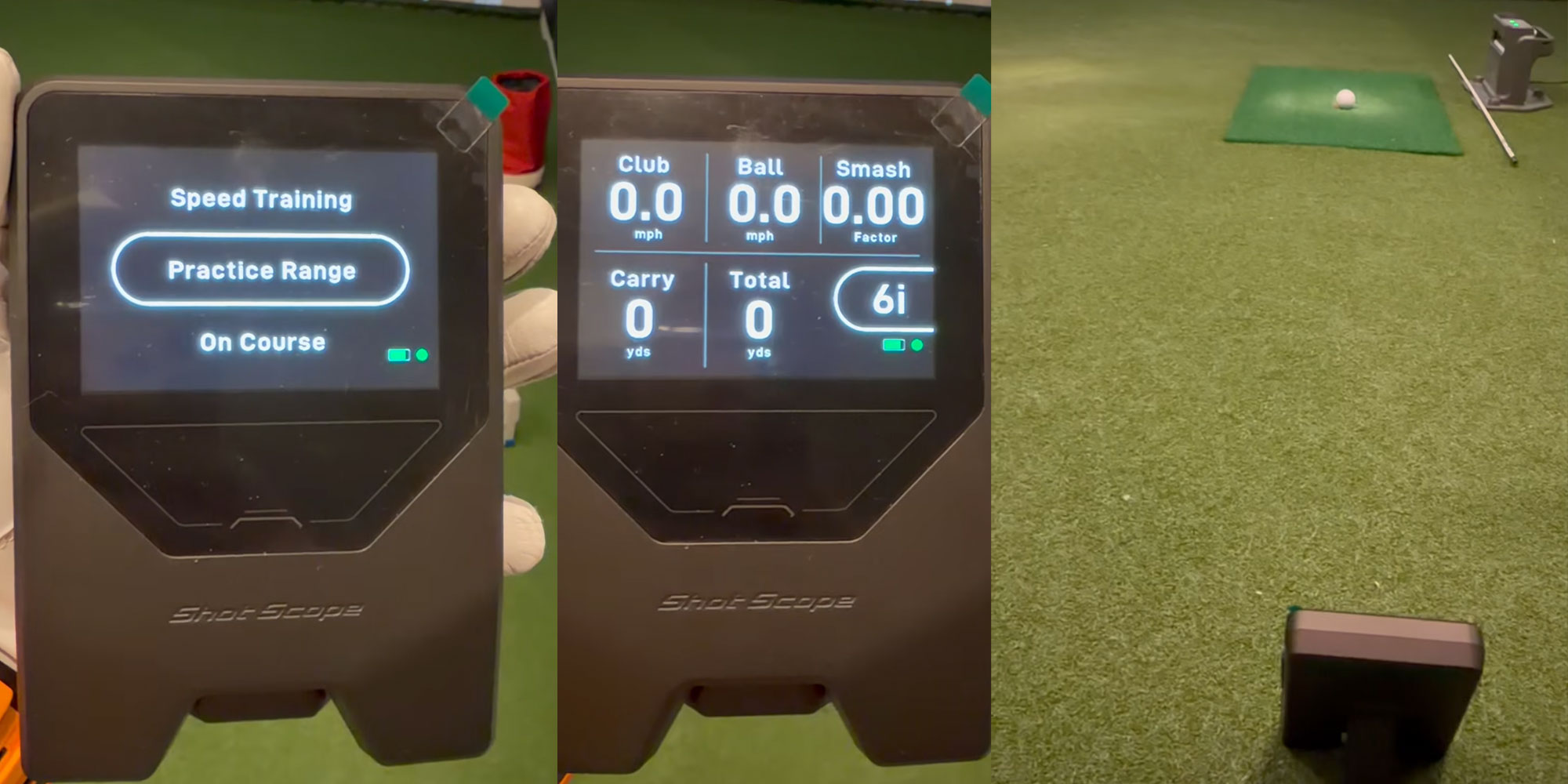
The whole process takes less than 30 seconds
There are 3 modes for when you start a session:
- Practice Range - Probably the mode people will use most often. Select a club and hit away to get your numbers
- Speed Training - For measuring clubhead speed without a golf ball, and typically with some form of speed training stick like Ryp or Super Speed.
- On Course - I haven't tried this yet, but assumedly you connect the device to your shot scope app and if you use the device on course, it supposedly will map your shots on the course but now with your LM1 numbers attached to each shot.
Pretty nifty, albeit a little cumbersome.
It's probably one of those features you might use in spurts if you’re playing as a single and youre behind a foursome who wont let you through.
Admittedly I don't have a ton of knowledge on this mode and there isn’t much documentation on this feature I could easily find.
Hopefully I'll get out on the course soon with the LM1, or maybe we’ll find out more next week when the product launches.
For the purposes of this next section, we’ll focus the review on the most commonly used mode, the Practice Range mode.
Is it accurate?
The short answer is, to my expectations, YES! It is accurate with some caveats that should be common sense at this price point. But Ive already seen reddit posts with people complaining that its 3 yards off and unusable. Which if that worries you, you’re either way way better at golf than 99.9 percent of the population, or you need to chill out. I’m thinking for most of my readers, it’s the latter.
Also accuracy is more than somewhat dependent on the test conditions and how you are measuring.
Example, if you are at a driving range using a top tracer to compare… I wouldn’t call those accurate and sterile test conditions.
So how did I test? and what were the results?
I tested against my Skytrak+ ( a unit that is known to have very good accuracy) with a 2026 TP5 golf ball indoors in my sim.
I tested a wedge, a short iron and my driver. Recorded the results and compared.
Check out my video below to see the details. The test starts at about 30 seconds in. The recorded results were quite accurate given some caveats that ill review.
For folks without the time for the video, here's a side by side of one of my more solid contact swings that actually didnt make it into the original video test. This swing was from a different day than the video. I just wanted to check this one more time after I did the test because I was in such disbelief of the accuracy, and the day I recorded the test for the video it was super late at night and I wasn't swinging my best.
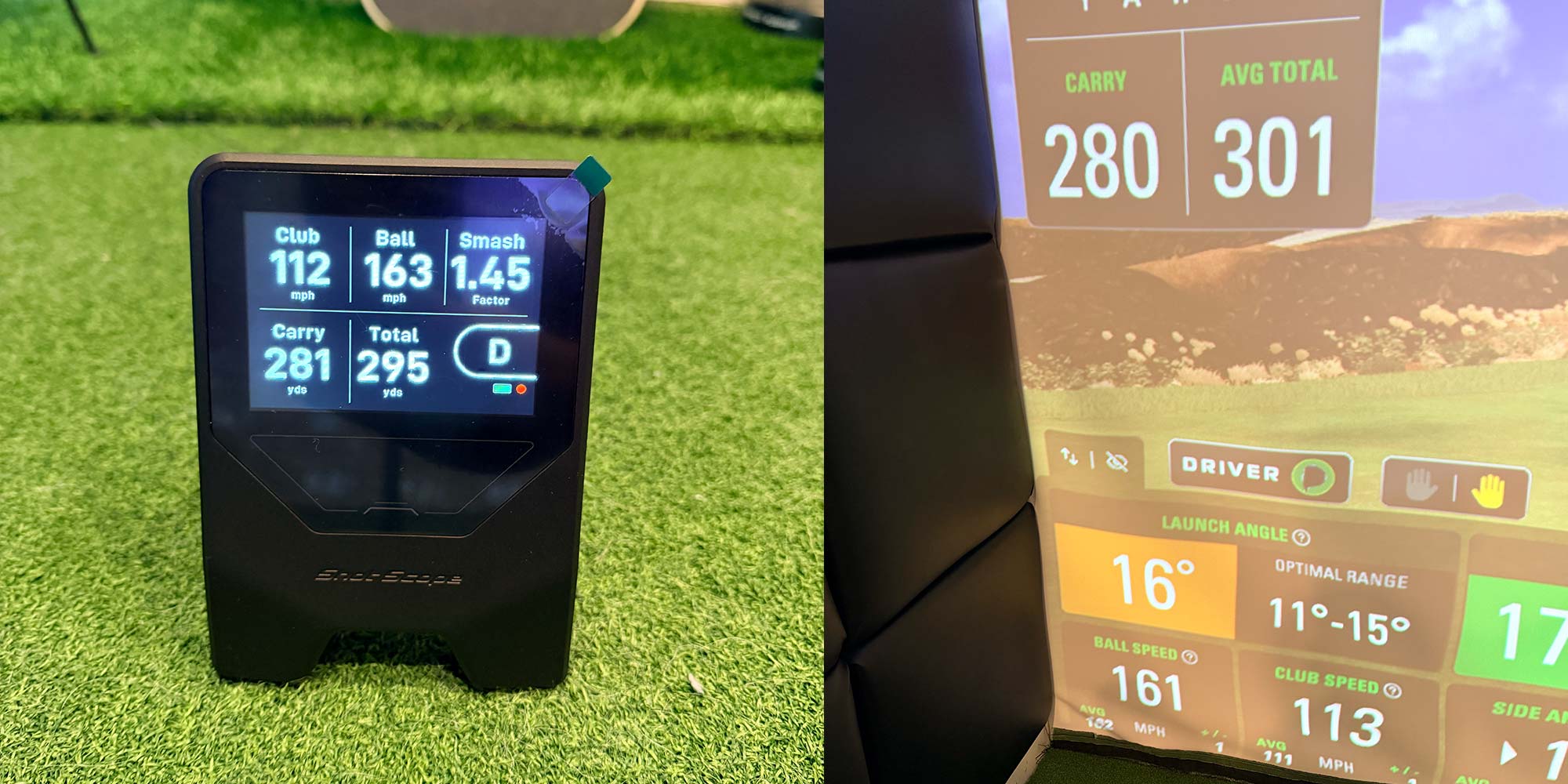
Here were my averages with multiple clubs showing a screenshot from the app, and a data export from Skytrak+, side by side.
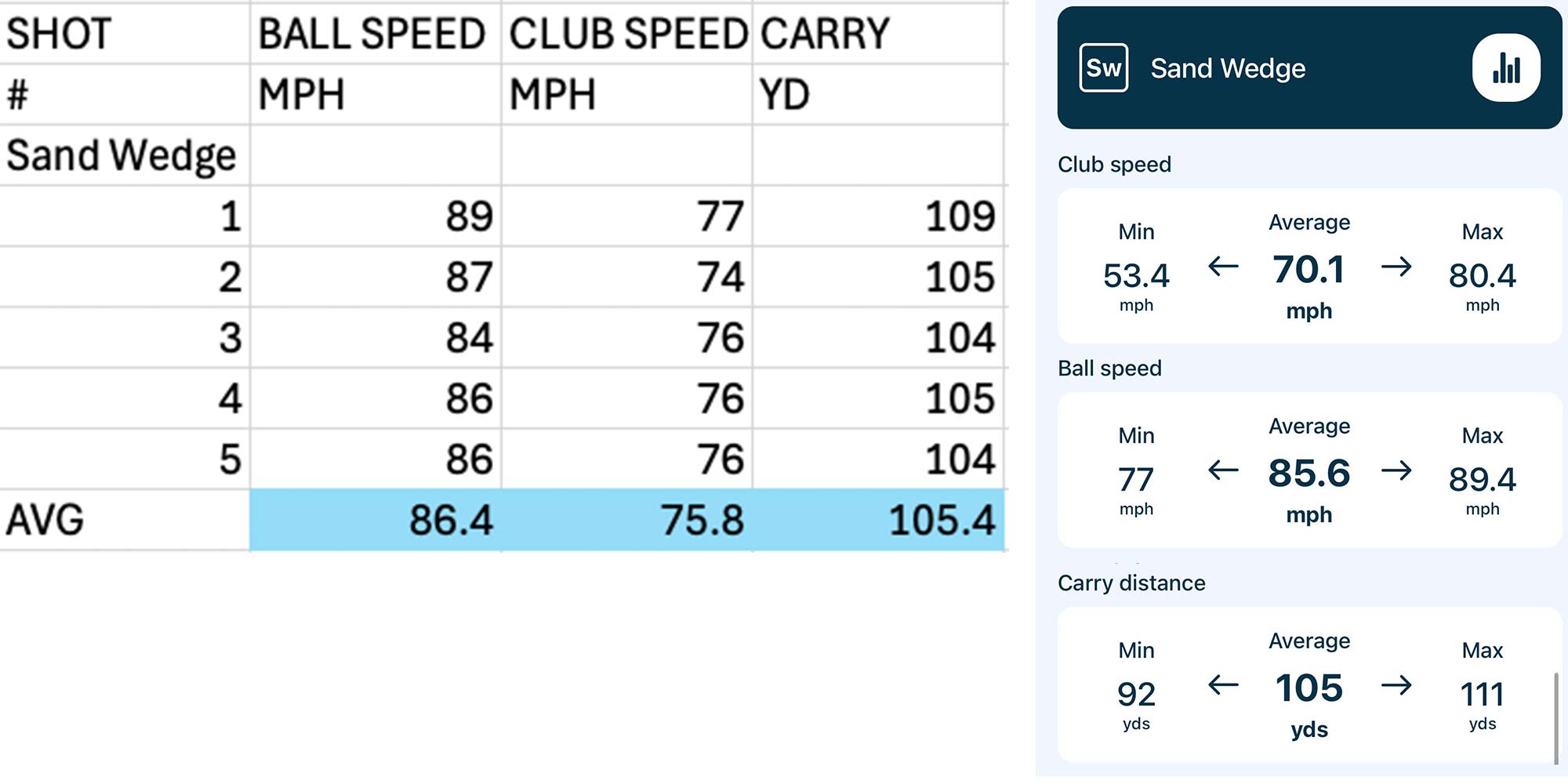
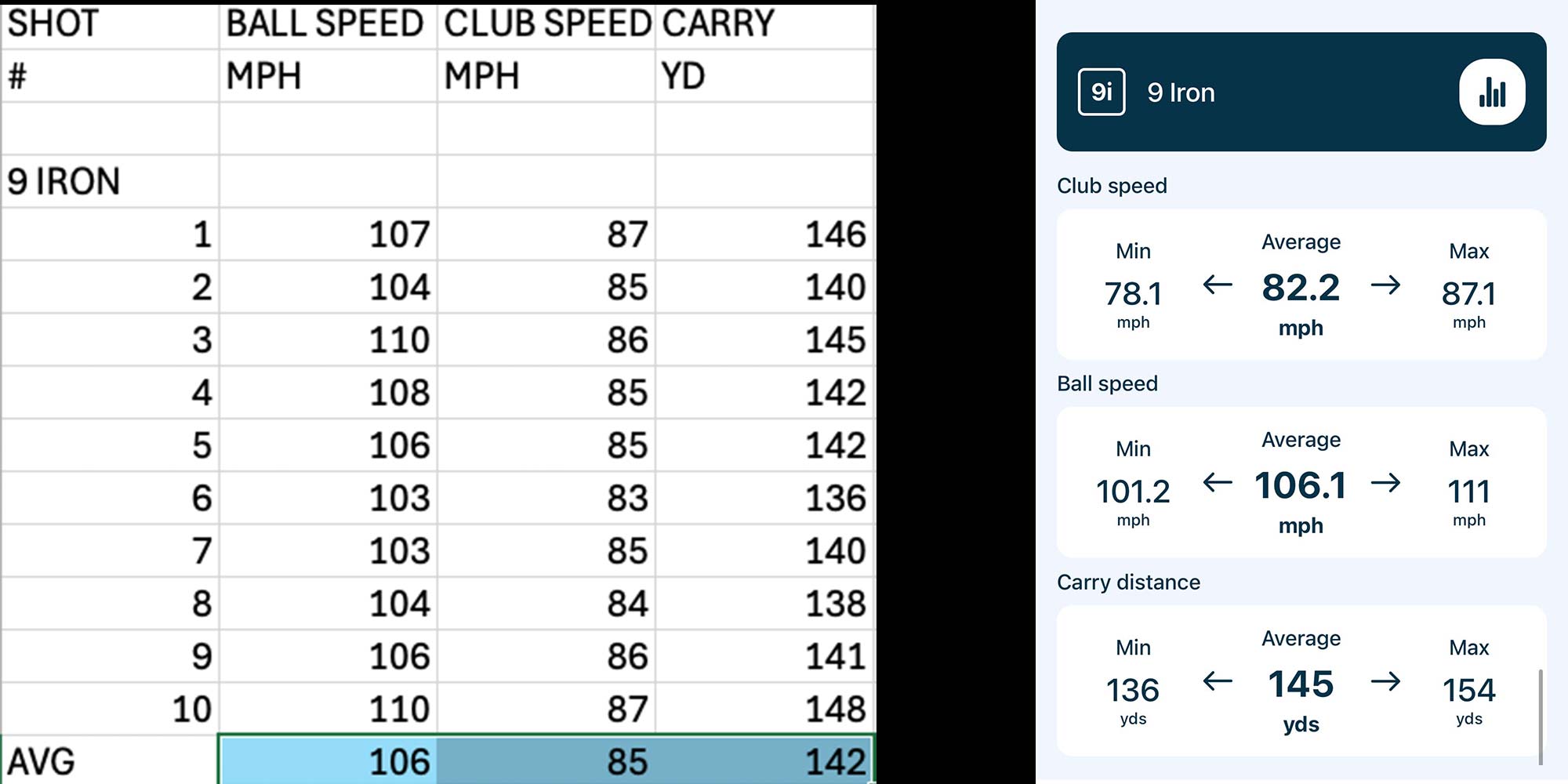
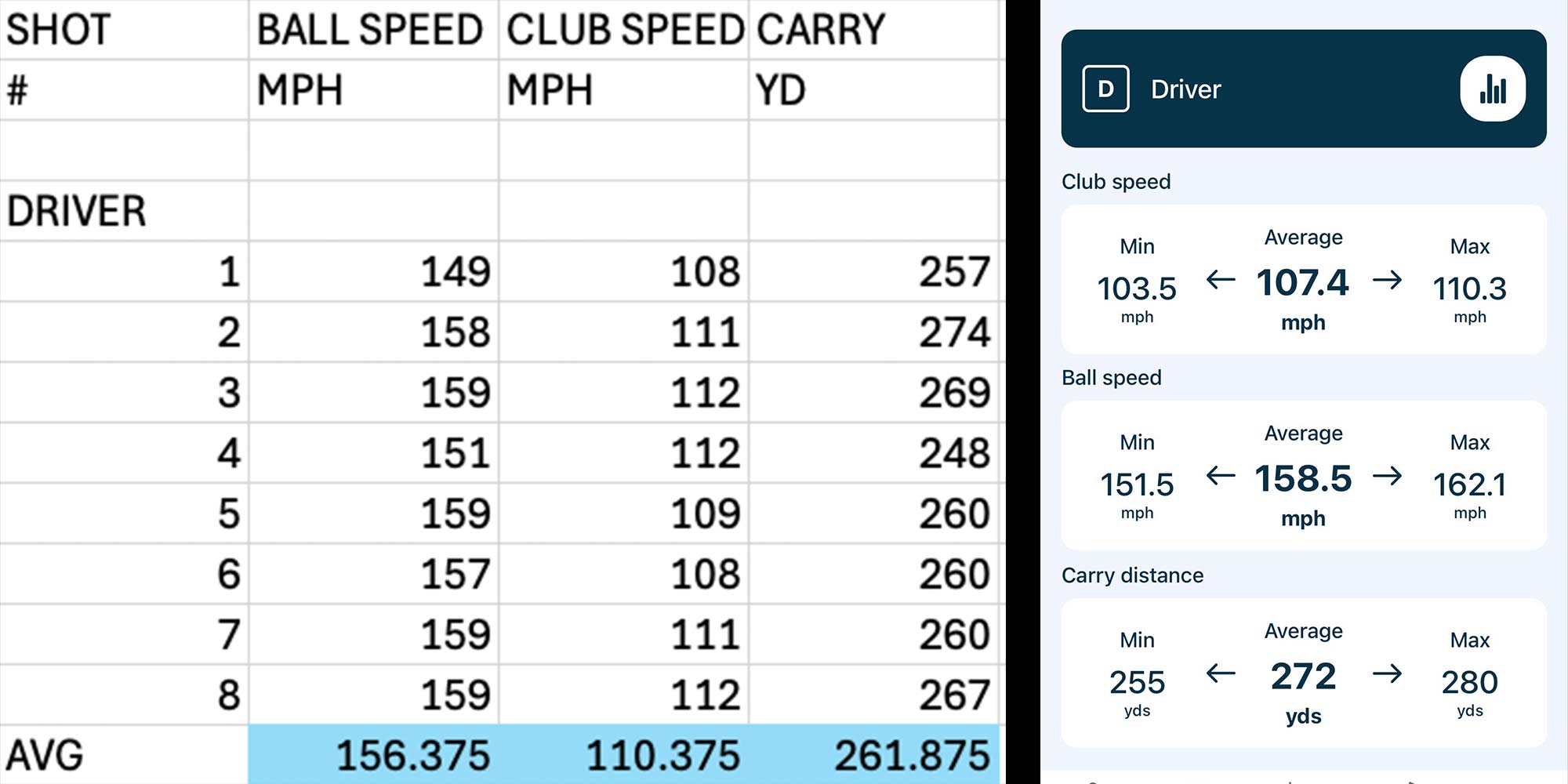
As you can see, the wedge and the iron were really on point. I’d call them phenomenally close when the context is you are comparing a proper prosumer 2k Simulator grade launch monitor to a 200 dollar piece of tech.
The only item that was off on the wedges and irons with any significance was the clubhead speed compared to ST+. This is probably the least important metric for those clubs. Even more so its less important for that number to be dead on balls accurate (as every device has a little deviation for this measurement), and more important for it to just be consistent.
Now, there was a larger discrepancy on the driver carry yardage. The LM1 was consistently longer by a fair portion (11 yards on average) Than my Skytrak+.
My hypothesis on this is because of spin conditions and that spin variance tends to get to a much wider range on driver between shots for most of us amatuers vs the irons, even on shots we would consider solid.

Shot Scope is murky on the details about spin, admitting that it is in some amount captured to a degree to help aid the carry algorithm. But that’s about all the details they are willing to expose.
So I believe that when you hit one that has very high or very low spin that would rob your ball of carry yardage, shot scope isn't fully accounting for that as spin isn't fully measured, and hence those shots are going a fair amount further on shot scope than they would on a unit that more accurately measures spin.
So if you’re a person who has very odd spin conditions (way high or way low) on your normal shot:
- You’re probably losing a lot of yards off the tee for your speed.
- Get a lesson and/or a driver fitting to get your spin in the optimal range so you can hit significantly longer drives.
- The Shot Scope LM1 carry yardage for driver is going to be less accurate for you than irons and wedges.
But if you typically hit driver within at least a semi optimal spin range, then as you can see on the video above, it’s still a pretty accurate unit, except when you have that big miss hit that alters spin significantly.
(Mostly) Minor Gripes
So I’ve had almost all good things to say about this unit.
But I have to be transparent about the few minor issues I’ve had with it and maybe some very nit picky little annoyances that are complete first world problems haha.
- Sync Issues.
We are living in an apple connected world, and I am an apple connected girl...or boy actually. (High Five for getting an 80s Madonna reference into the article).
We’re all so spoiled and used to data and connectivity between devices just being seamless and easy. So when something doesn’t work like Apple products, we are thrown.
But there is a bit of an issue with Shot Scope's syncing and connectivity. I have found a repeated annoyance where I often have to restart the app, the device, or both to get it to connect and sync the data. It’s consistent enough, and Ive heard from others that it happens to them with other Shot Scope products.
So if you are going to get this unit, it’s likely something you’ll have to learn to live with.
- Inability to delete individual shots from a session.
Sometimes you just make a really bad swing, sometimes it picks up a practice waggle, sometimes you see an obvious misread, this happens on every device.
Point is sometimes you just don't want a shot to count towards your performance data. Well currently theres no way to delete an individual shot. You delete an entire practice session, but that doesnt really cover this use case.
Since this is a part of the scope of basic operations for a database, aka CRUD for all of us nerds out there. I fully expect that this is a feature that will be coming at some point in the future, and it just came down to a matter of time and wanting to get this to market and not having that ready yet. But it is something you'll have to deal with for at least a little while. - Buttons on the side are sub-optimal UX.
This is a majorly nitpicky first world problem, but the side controls to navigate the unit aren’t the most convenient.
So example, if you want to select an 8 iron, you have to scroll through Driver , 3w, 5w 7w, H1, H2, H3, H4, 3i, 4i, 5i, 6i, 7i , 8i.
That’s 14 clicks after you start the session to change the clubs. And if you did this after you set up the unit in its position behind the ball, then you have to bend down and click this one button 14x, hoping you don't accidentally click the wrong button to move it out of the session.
Of course the more you use this, the better you get at it. But other units that directly compete against the LM1 solve this issue. Some have remotes with a button for each club, or touch screens that allow you to get where you need to in 2 clicks. So comparatively, this feels cumbersome.
- My last gripe and probably my biggest one. Carry distances do not take into account altitude.
Now to the fine lads and ladies in Scotland at Shot Scope, living and playing golf at sea level, this last gripe might be a total edge case. But to me, as someone who lives in metro Denver and plays the majority of his golf at 6000+ feet of altitude, it’s a real use case.
If I didn’t already know my yardages and I was using this to bag map, I would have to manually calculate my actual distances at altitude. Then those also wouldnt be in the app.
It just sorta makes the ecosystem break down a little when there’s no way to account for it.
When a friend of mine locally here in Colorado asks about the LM1. I have to put a strong caveat on the recommendation, as in hey as long as you’re ok with it reading your yardages short of where you hit it, then it’s a great unit.
Lastly if you wanted to use this when you travel and warm up to see your yardages for the elevation you are playing at, this simply won’t do the job.
So these are my gripes. But in the grand scheme of things, for $200, I think these are (mostly) minor inconveniences.
Final Thoughts… For now.
Shot Scope is making waves in the industry by offering for $200 not only a very accurate launch monitor (albeit with carry distances that can only be set to sea level), but also access to an excellent app and ecosystem for game improvement.
The pre-sale for this unit initially crashed the shotscope.com website and then when they re-launched the presale, it sold out, I believe within 24 hours.
So there was a lot of hype around this product and its launch, especially its accuracy at this pricepoint.
And in my opinion it (mostly) lives up to the hype.
I think this product is for you if you:
- Want a launch monitor for the driving range to help make your range sessions more fun and measurable.
- Want something easy to setup on the course so you could potentially measure some metrics while playing (in a practice round without holding up play please!)
- Live at or close to sea level and would like something easy and high value to help you map your bag and yardages.
- Hate subscription fees
- Have an indoor hitting net (no sim) and have no other device and don’t want to break the bank on an LM that can give you some basic numbers to make your practice more insightful and interesting
- Want to get your foot in the door to Shot Scope's high value, no subscription app and ecosystem.
This product probably isn't for you if you:
- Need spin numbers
- If you’re using this mainly for driver distance AND you’re way too high or low spin with the driver on your contact.
- You want to bag map at altitude
- You want to get distances at different altitudes when you travel
It’s early days, I’ve only had the product for 1 week. I haven't been able to take it on the golf course to test the on course mode or see what some of my golf buddies think of it, or how they might use it. So my opinion of the LM1 might change. But as of now, I think this is a good value and a great buy, outside of a few use cases that I mentioned above.
Stay tuned for updates. Ill update the review as I use the product more.
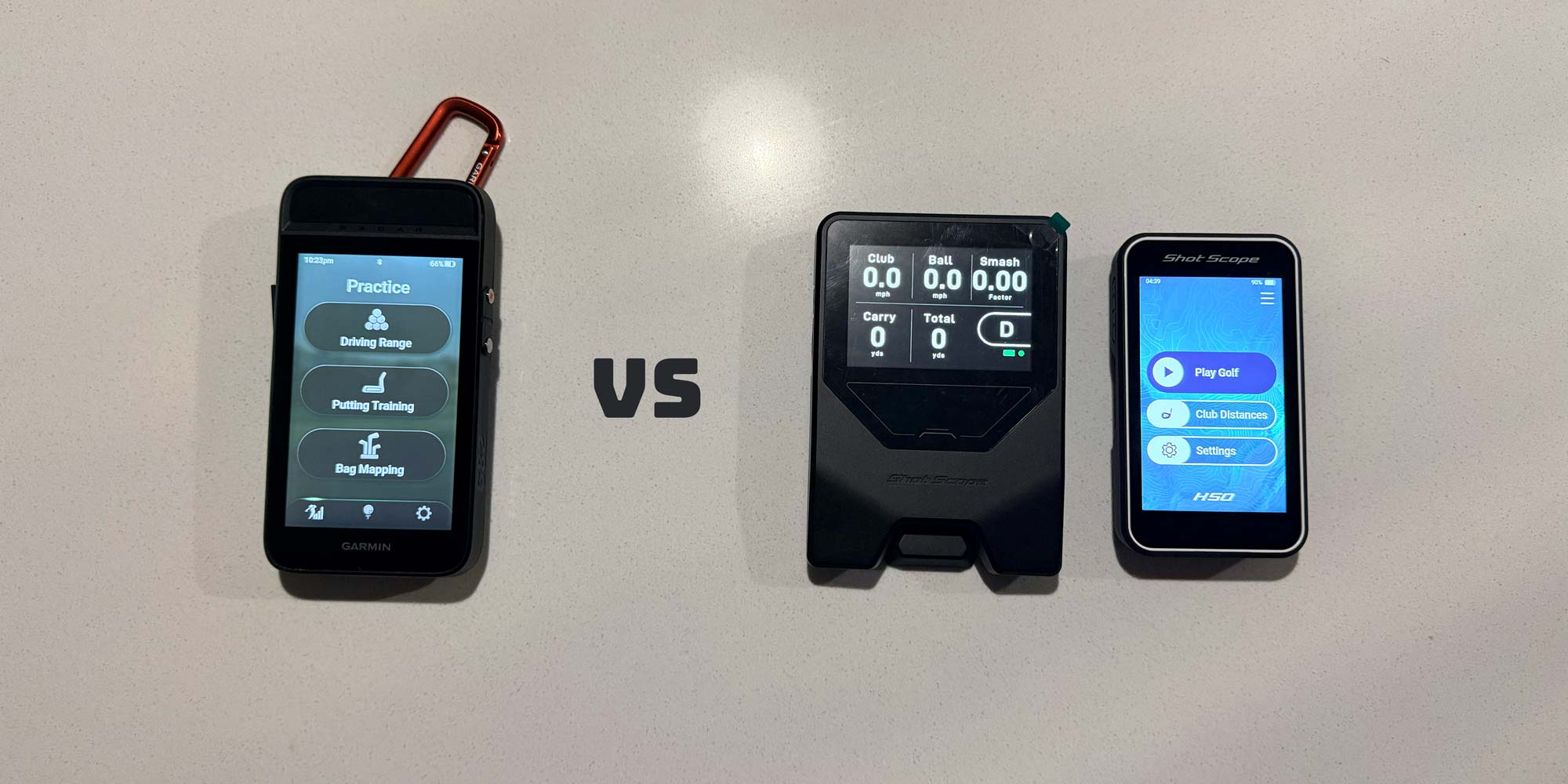
I’ll also be reviewing related products including the Garmin G82 and the Shot Scope H50.
I’ll also do a full comparison of the Garmin G82 vs the Shot Scope LM1 and H50 combined.
By Dada Golfs standards, this was a long one, thanks for sticking with me to the end.

Lorem ipsum dolor sit amet, consectetur adipiscing elit. Suspendisse varius enim in eros elementum tristique. Duis cursus, mi quis viverra ornare, eros dolor interdum nulla, ut commodo diam libero vitae erat. Aenean faucibus nibh et justo cursus id rutrum lorem imperdiet. Nunc ut sem vitae risus tristique posuere.